Salesforce Data Cloud: 5 Ways AI Integration Transforms Customer Data in 2026
Salesforce Data Cloud and AI integration explained: how unified data powers Einstein, Agentforce, and smarter customer decisions today.
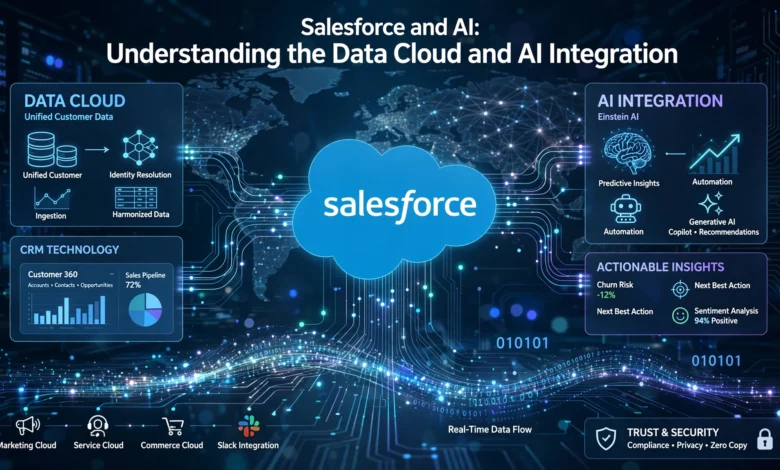
Salesforce Data Cloud has quietly become the backbone of how modern businesses run artificial intelligence on top of their customer relationships. If you’ve spent any time in the Salesforce ecosystem over the past couple of years, you’ve probably noticed the conversation shifting. It used to be about dashboards, pipelines, and reports. Now it’s about agents that act, models that predict, and data that updates itself in real time.
That shift didn’t happen by accident. Salesforce AI tools like Einstein and Agentforce are only as good as the data feeding them, and for a long time, that data was scattered across a dozen disconnected systems. A customer’s purchase history lived in one place, their support tickets in another, their marketing preferences somewhere else entirely. AI built on top of that mess produced shaky, unreliable results.
Data Cloud exists to fix exactly that problem. It pulls information from every corner of a business, cleans it up, and presents it as one coherent customer profile that AI tools can actually trust. Once that foundation is in place, everything else, personalized marketing, predictive sales forecasting, autonomous service agents, gets noticeably better.
This article walks through what Salesforce Data Cloud actually does, how it connects to Salesforce’s AI stack, and what that means for businesses trying to make sense of it all in 2026.
What Is Salesforce Data Cloud?
Salesforce Data Cloud is a customer data platform built directly into the Salesforce ecosystem. Its job is simple to describe but hard to pull off: take data from every system a company uses, whether that’s a website, a point-of-sale system, an ERP, or a third-party app, and stitch it together into a single, accurate view of each customer.
Before Data Cloud, companies relied on a patchwork of integrations, spreadsheets, and manual exports to get a full picture of a customer. Sales teams saw one slice of the relationship, service teams saw another, and marketing worked off yet another set of assumptions. None of these teams were technically wrong, they just had incomplete information.
Core Functions of Data Cloud
- Data ingestion: pulling in structured and unstructured data from CRM systems, websites, mobile apps, and external databases
- Identity resolution: matching records that belong to the same person or account, even when names, emails, or IDs don’t match exactly
- Real-time updates: reflecting new customer actions (a purchase, a support call, a website visit) almost instantly rather than on a nightly batch schedule
- Data governance: applying permissions, consent rules, and privacy controls so sensitive data isn’t exposed to the wrong teams or tools
- Activation: making the unified profile usable across Salesforce apps and AI tools, not just sitting in a database
Why Unified Data Matters for AI
AI models are pattern-matching machines. Feed them incomplete or contradictory data, and they’ll confidently produce recommendations that don’t hold up. A sales forecast is only as good as the deal data behind it. A customer service agent can’t resolve an issue if it doesn’t know a customer already called twice this week. Data Cloud solves this by giving every AI tool in the Salesforce ecosystem the same accurate, current picture of the customer to work from.


How Salesforce AI Uses Data Cloud
Salesforce’s AI capabilities sit on top of Data Cloud rather than beside it. That distinction matters. Einstein and Agentforce don’t pull from a separate AI database, they draw directly from the same unified customer profiles that sales, service, and marketing teams already rely on.
Einstein AI and Predictive Intelligence
Einstein has evolved quite a bit from its earlier days of lead scoring and basic forecasting. The current generation goes further, generating content, surfacing insights, and flagging patterns directly from CRM data rather than requiring analysts to dig for them. Einstein now moves well beyond predictive analytics and workflow recommendations to include generative AI capabilities, autonomous agents, and deeper integration across the Salesforce ecosystem. That’s a meaningful jump from a tool that mostly told you what happened to one that can help decide what to do next.
Some practical examples of Einstein working off Data Cloud information:
- Predicting which leads are most likely to convert based on real engagement signals, not just static form fills
- Recommending next-best actions for a service agent based on a customer’s full history, not just the current ticket
- Drafting personalized email content using a customer’s actual purchase and browsing behavior
- Flagging accounts at risk of churn before a human notices the warning signs
Agentforce and Autonomous Actions
Agentforce is where things get more interesting, and more demanding on the data side. Unlike a chatbot that answers questions from a script, an Agentforce agent is expected to take action: process a return, check inventory, update a record, escalate a case. This kind of agentic behavior requires systems to be connected through real-time APIs so the AI can act on its own rather than simply respond.
That requirement is exactly why Data Cloud has become non-negotiable for serious AI deployments. An AI agent is only useful if it can access knowledge, systems of record, and take actions across platforms, and integration work is what bridges that gap between a model’s reasoning and the real systems it needs to touch.
Real-Time Data and Zero-Copy Integration
One of the more technical, but genuinely important, shifts in how Data Cloud works involves how it connects to external systems. For years, integration meant copying huge amounts of data out of a warehouse and into Salesforce, which created duplication, delays, and security headaches.
The Zero-Copy Approach
Rather than duplicating datasets, Data Cloud now supports what’s often called a “Bring Your Own Lake” model. This lets Salesforce connect directly to data warehouses like Snowflake, BigQuery, or Databricks without physically moving any data. The practical benefit is straightforward:
- Less data duplication, which means fewer sync errors and less storage overhead
- Lower security risk, since sensitive data isn’t copied into multiple locations
- Faster access to information, because Salesforce reads from the source rather than waiting for a batch import
Event-Driven Architecture
Data Cloud also leans on an event-based model rather than constant polling. Instead of Salesforce repeatedly checking whether something changed in an external system, that system publishes an event the moment something happens, a shipment created, a payment processed, a support ticket closed. Salesforce subscribes to that event and immediately triggers the next step in the workflow, resulting in sub-second automation. For AI agents making decisions in real time, that speed difference is the gap between a useful response and a stale one.
MuleSoft’s Role in the Integration Layer
None of this works without a solid integration layer connecting Salesforce to the outside world. MuleSoft connectors simplify AI integration by letting organizations merge Salesforce with external applications, databases, cloud services, and AI tools through a unified framework, which cuts down on the complexity of building and maintaining custom connections between systems.
Business Benefits of Data Cloud and AI Integration
Businesses adopting Salesforce Data Cloud alongside AI tools tend to see improvements in a few specific areas, rather than some vague, across-the-board transformation.
Improved Personalization
When marketing, sales, and service teams work from the same customer profile, messaging stops contradicting itself. A customer who just complained about a delayed shipment shouldn’t get a cheerful upsell email the next day. Unified data prevents that kind of disconnect.
Better Forecasting and Decision-Making
Sales forecasts built on real, current pipeline data are simply more trustworthy than ones built on data that’s a week or two stale. The same goes for inventory predictions, churn models, and service capacity planning.
Faster, More Relevant Customer Service
Service agents, human or AI-driven, work faster when they aren’t hunting across five systems to piece together a customer’s history. A unified profile means fewer repeated questions and faster resolutions.
Stronger Governance and Trust
AI adoption tends to stall when leadership doesn’t trust the outputs, or worse, when a company can’t clearly explain how customer data is being used. Real-time data collaboration tools such as Clean Rooms within Data Cloud let organizations share insights securely across teams and with partners without compromising privacy, which matters quite a bit in regulated industries where a misstep can carry real legal consequences.
Measurable ROI
The financial case for this kind of investment is becoming clearer as more organizations move past the pilot stage. Deloitte research has found that many organizations struggle to move from pilot programs to production because gaps in legacy system integration prevent AI from accessing real-time data and triggering actions reliably. Once those integration gaps are closed, though, organizations typically see measurable return on investment within three to six months.
Common Challenges in Implementation
None of this is plug-and-play, and it’s worth being honest about where companies tend to get stuck.
Data Governance Ownership
One of the most common sticking points isn’t technical at all. It’s organizational. Teams often run into unresolved questions about who owns customer data governance, what counts as the single source of truth for customer identity, and how conflicts get resolved when sales and marketing disagree on the same customer record. These questions need answers before AI can be trusted with the data, not after.
Industry-Specific Data Modeling
There’s no one-size-fits-all setup here. Each industry requires its own approach to data modeling, since the way a retailer defines a “customer” looks nothing like how a healthcare provider or financial institution needs to structure the same concept.
Scaling Beyond a Single Use Case
A frequent mistake is trying to roll AI out everywhere at once. A more realistic path is to target one workflow, one team, or one customer segment where success is visible and measurable within weeks rather than years, then expand from there once the approach is proven.
Change Management
Even a technically flawless Data Cloud implementation will underdeliver if the people using it don’t trust it or understand it. Training, clear communication, and a reasonable rollout timeline matter just as much as the underlying architecture.
Getting Started: A Practical Approach
For businesses evaluating this now, a few steps tend to separate the implementations that succeed from the ones that stall out.
- Start with one measurable outcome. Pick a specific workflow, like lead scoring or case routing, rather than a vague goal like “use more AI.”
- Unify the data before automating anything. AI built on incomplete data will amplify existing problems, not fix them.
- Assign clear data ownership early. Decide who’s responsible for data quality and governance before disagreements come up.
- Deploy in production, not just pilots. A model that only ever runs in a sandbox never proves its value.
- Build in governance from day one. Retrofitting privacy and compliance controls after the fact is far harder than designing them in from the start.
For more detail on the governance and privacy frameworks involved, the Salesforce Trust and Compliance documentation covers how the platform approaches data security at scale. Businesses researching broader AI economic impact may also find PwC’s global AI research useful for benchmarking expected returns against industry trends.
Where This Is Headed
The direction is fairly clear at this point. CRM platforms are moving away from being passive systems of record and turning into active systems that execute work. Enterprise AI adoption is accelerating globally, with CRM platforms increasingly functioning as AI execution hubs rather than passive data repositories. Salesforce’s own numbers back this up: AI adoption has surged 282% since 2024, with full implementations growing from 11% to 42% of enterprises, and that trend doesn’t show signs of slowing.
What this means practically is that Data Cloud isn’t a nice-to-have add-on anymore. It’s becoming the required foundation for any serious AI initiative on the Salesforce platform. Companies that skip the data unification step and jump straight to deploying AI agents tend to run into the same wall: agents that hallucinate, recommendations that miss the mark, and automation that has to be babysat constantly.
Conclusion
Salesforce Data Cloud and AI integration work together as a single system, not two separate initiatives bolted onto each other. Data Cloud unifies scattered customer information into one trustworthy profile, and tools like Einstein and Agentforce use that foundation to generate accurate predictions, personalized content, and real, autonomous actions. The technical pieces, zero-copy integration, event-driven architecture, MuleSoft connectors, matter, but the organizational pieces, data governance, clear ownership, and a realistic rollout plan, matter just as much. Businesses that get both right tend to see real returns within months rather than years, while those that rush straight to AI without fixing their data foundation usually end up rebuilding from scratch. For any company serious about using AI inside Salesforce, understanding how Data Cloud and AI fit together isn’t optional background reading, it’s the starting point.


